


Mercado Libre: Compras online
4.876.79K Reviews
App Specs
- Version
- 10.564.3
- Updated On
- License
- Free
- Downloads
- 500,000,000+
- Developer
- Mercado Libre
- Categories
- Shopping
- Platform
- Android, iOS
Screenshots
 Analysis by AppCompare
I reach for Mercado Libre when I want to compare several kinds of listings without hopping between separate shopping apps. Its most useful strength is the breadth of its marketplace: a search can surface offers from different sellers, giving me more than one route to the same kind of item. That choice is convenient, but it also means I treat each listing as a decision to check rather than assuming the first result is automatically the best one.
Choice is the main capability
Mercado Libre is a free shopping app from Mercado Libre, built around browsing and buying across a broad online marketplace. Its scale is reflected in more than 500 million installs and an average rating of 4.8 from around 25 million ratings. Those figures suggest it has become a familiar place to shop, but they do not replace the practical work of comparing a particular seller, delivery estimate and product description.
The app is rated Teen, and its current version is 10.541.7. It has been available since September 7, 2011, and runs on Android 6.0 or later. I would think of it less as a curated single-store catalogue and more as a busy shopping hub: the benefit is variety, while the trade-off is that results can require a little judgment.
Guides and Analysis on Mercado Libre: Compras online
How I make a search useful
For a specific item, I start with a clear search phrase, then narrow the results using the available filters. Price and delivery time can help remove options that are plainly outside my budget or schedule. After that, I compare a small number of listings rather than scrolling indefinitely. This is a simple habit, but it makes a large marketplace feel much more manageable.
I also look beyond the headline price. A listing’s seller information, reviews and delivery details give useful context, especially when several offers appear similar. The cheapest result may still be a poor fit if its timing or description does not suit what I need. I find that checking these details before adding an item to my cart is easier than trying to reconstruct the choice later.
A realistic reason to open it
Imagine that a kitchen appliance stops working shortly before a busy week. I can search for a replacement, compare different sellers, and use delivery-time filters to focus on options that might arrive when I need them. If I am not ready to decide, I can save a promising listing to my wishlist and come back after comparing it with other choices. That workflow is more practical than letting urgency push me into buying the first result.
For less urgent purchases, I use the same approach at a slower pace. I might save a few alternatives, check their descriptions again later and make a decision only once I know which features matter to me. A wishlist is most helpful when it is a shortlist, not a dumping ground: keeping only the options I might genuinely buy makes the comparison easier.
Worth Reading Before You Choose

Basketball Stars: Multiplayer Is Fast, but Can It Recover When Matches Go Wrong?

WEBTOON Turns Phone Updates Into a Better Reading Routine

Link to Windows Runs on Shared Habits, Not Social Feeds

How Alibaba.com Dominates the B2B Marketplace

Metro's Quiet Rise: Redefining Mobile Communication

Harnessing Ecosystem Power with Phone Tracker by Number
Where it fits among shopping options
Compared with shopping from one retailer, a marketplace can offer more seller and price variety in a single search. That is useful when I am still deciding what to buy or want to see how different offers compare. A retailer’s own app may be simpler when I already know the exact shop and product I want, while a specialist store can be a better place to investigate a technical item in depth. I use Mercado Libre when choice is the advantage I need, not because every purchase belongs there.
The same variety that makes browsing worthwhile can also make it tiring. Search results may include options that look alike but differ in seller, delivery timing or listing details. I avoid treating popularity or a low price as a substitute for reading the offer carefully. If I need a product immediately, or I am not comfortable comparing sellers, a familiar local retailer may be the more reassuring route.
Exploring the App's Features
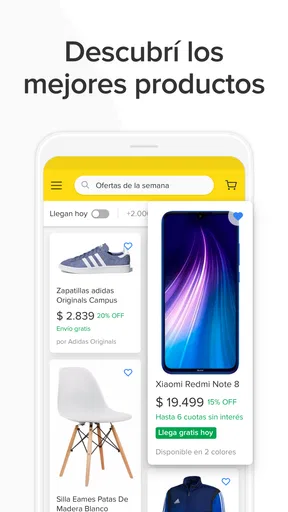
First things first, downloading and setting up Mercado Libre is a breeze. A few taps, and you're in! The app welcomes you with a clean and intuitive interface, ensuring you’re not overwhelmed by the sheer number of options available. From the home screen, you can dive into various categories or use the search bar to find exactly what you’re looking for.
One of the standout features is the personalized recommendations. It’s like the app knows you better than you know yourself! As you browse and shop, the algorithm learns your preferences, showing you deals and products that align with your tastes. It’s shopping made not just easy, but also smart.
Navigating the Marketplace
With a vast array of sellers, Mercado Libre ensures you have plenty of choices. From individual sellers to big-name brands, the diversity is impressive. You can easily compare prices, check seller ratings, and read reviews before making a purchase. It’s like having a personal assistant sifting through the best deals for you.
The app also boasts a robust filtering system. You can sort products by price, popularity, and even delivery time. This means you spend less time searching and more time shopping. And speaking of delivery, many sellers offer fast shipping options, so you’re not left waiting for weeks to receive your goodies.
Secure and Convenient Transactions
Security is a big deal when it comes to online shopping, and Mercado Libre doesn’t disappoint. The app supports various payment methods, from credit cards to digital wallets, ensuring you can pay in a way that suits you. The checkout process is straightforward and quick, so you can complete your purchase with just a few taps.
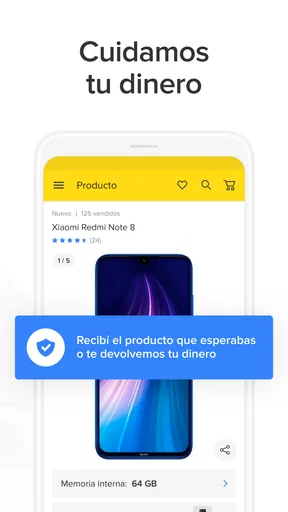
Additionally, the app offers buyer protection, which is a reassuring feature. If anything goes wrong with your order, the support team is just a message away, ready to assist you. It’s this kind of attention to user security and satisfaction that makes the app stand out.
Deals, Promotions, and More
Who doesn’t love a good deal? Mercado Libre is packed with promotions and exclusive offers. The app frequently hosts sales events where prices drop significantly. Signing up for notifications ensures you never miss out on these fantastic offers. Plus, if you’re someone who enjoys a good auction, the app occasionally runs auctions on select items, adding an exciting twist to your shopping experience.
Another cool feature is the wishlist option. If you’re not quite ready to buy, you can save items for later. It’s a handy way to keep track of those must-have products without cluttering your cart.
User-Friendly Experience
Let’s talk about the user experience. The app’s design is sleek, with a focus on usability. It doesn’t matter if you’re tech-savvy or a newbie; navigating through the app feels natural. The layout is logical, and the load times are minimal, ensuring a smooth shopping journey.
For any issues or queries, the app offers comprehensive customer support. Whether you prefer chatting with a representative or browsing through the FAQs, help is always at your fingertips. It’s like having a support team in your pocket.
One useful way to keep a purchase from becoming a rushed decision is to separate browsing from checkout. I can save a few candidates, then revisit them with a clearer idea of what matters: the seller’s track record, the delivery estimate, and whether the description answers my questions. For household basics, that pause may not feel necessary; for a higher-cost or less familiar item, it is a sensible check. The marketplace’s convenience works best when I use its choice to compare, not simply to buy faster.
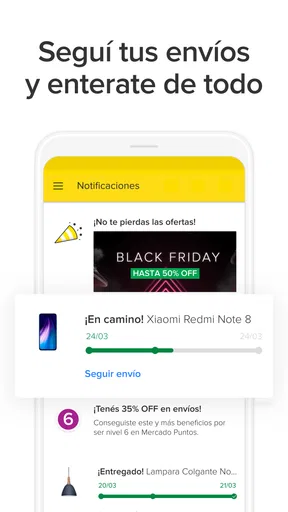
Notifications can help when I am watching for an offer, but I would be selective about which shopping alerts I allow through. A steady stream of sale prompts can turn a practical search into impulse browsing. I prefer to enable reminders only when I have a specific item in mind, then use the app’s saved-list workflow to return to it. That keeps promotions useful without making every discount feel urgent.
Before paying, I reread the listing rather than relying on a thumbnail or a short title. Similar-looking products can have different specifications, and a seller’s wording may include details that matter to the intended use. I also check whether the delivery estimate suits the occasion. This is particularly important for gifts or replacements: a good price is not much help if the item arrives after the moment when I need it.
People often ask whether a large marketplace is suitable for a first online purchase. I think it can be, provided the buyer takes time to inspect seller feedback, product information and delivery terms before committing. The app brings those shopping tasks into one place, but a new user still benefits from starting with a straightforward item and reading each screen carefully. Someone who wants a highly guided, single-retailer experience may feel more comfortable shopping directly with a store they already know.
Another common concern is whether browsing requires an immediate commitment. It does not: searching and comparing can be part of the decision process, and the wishlist gives a place to keep options for later. I would still treat saved products as temporary notes, since availability and offer details can change. When I return to a saved item, I check the current listing again rather than assuming it is unchanged from the day I first saw it.
Mercado Libre is most useful for people who value range and are willing to make a few careful comparisons. It can suit busy households, bargain hunters who want to inspect several offers, and anyone who is not yet sure which listing best fits a need. It is less ideal for shoppers who dislike evaluating sellers, want expert advice for a specialized purchase, or need a guaranteed immediate pickup. In those cases, a specialist retailer or nearby shop may offer a more direct path.
Overall, I see the app’s broad marketplace as its defining strength, with the corresponding responsibility to shop attentively. Search filters, seller reviews and a shortlist in the wishlist help turn a crowded catalogue into a manageable decision. I would not use every promotion as a reason to buy, and I would not skip the listing details just because checkout feels easy. Used with that bit of care, it is a practical shopping companion for comparing options and deciding on my own terms.
In conclusion, Mercado Libre: Compras online is more than just a shopping app; it’s a gateway to a world of possibilities. With its user-friendly interface, extensive product range, and top-notch security, it’s no wonder it’s a favorite among online shoppers. So why wait? Download the app today and start exploring the endless options. Happy shopping!
Pros
- Wide variety of products available.
- User-friendly interface for easy navigation.
- Secure payment options enhance safety.
- Real-time tracking for all purchases.
- Frequent discounts and promotions offered.
Cons
- Occasional delayed customer service response.
- Some items may have high shipping fees.
- Limited availability in certain regions.
- App notifications can be overwhelming.
- Returns policy may vary by seller.
FAQs for Mercado Libre: Compras online
Is Mercado Libre free to use?
Yes, downloading and using Mercado Libre is free. However, while browsing and searching for products incurs no charges, remember that purchases will involve costs such as the item's price and potential shipping fees. Some sellers may offer promotions or free shipping, so it's worth checking the details before purchasing.
How secure is my personal information on Mercado Libre?
Mercado Libre employs encryption and security measures to protect your personal information. They also offer a secure payment system called Mercado Pago, which safeguards your financial data during transactions. Always ensure you're using the latest version of the app for optimal security features.
What payment methods are accepted on Mercado Libre?
Mercado Libre accepts a variety of payment methods, including credit and debit cards, PayPal, and their own Mercado Pago wallet. Depending on your location, additional payment options such as bank transfers or cash payments at designated locations may be available. Check the app for specific options in your area.
Can I track my orders on Mercado Libre?
Yes, Mercado Libre provides order tracking within the app. Once your purchase has been shipped, you can access the tracking information under the 'Purchases' section. This feature allows you to see the current status and estimated delivery time of your order.
What is the return policy for purchases made on Mercado Libre?
The return policy on Mercado Libre varies by seller, but the platform generally supports returns for items that arrive damaged, defective, or not as described. It's crucial to review the seller's return policy before purchasing and contact customer support if you encounter any issues with your order.


